The 'Fraudulent Activity' email scam is a phishing campaign that attempts to trick recipients into believing their bank account, credit card, or online payment service has detected suspicious transactions. These emails use urgent language and official-looking branding to pressure victims into clicking malicious links or revealing sensitive financial information. Unlike traditional malware that infects your computer through executable files, this scam relies entirely on social engineering—manipulating you into voluntarily handing over passwords, account numbers, or personal identification details that criminals can use for identity theft and financial fraud.
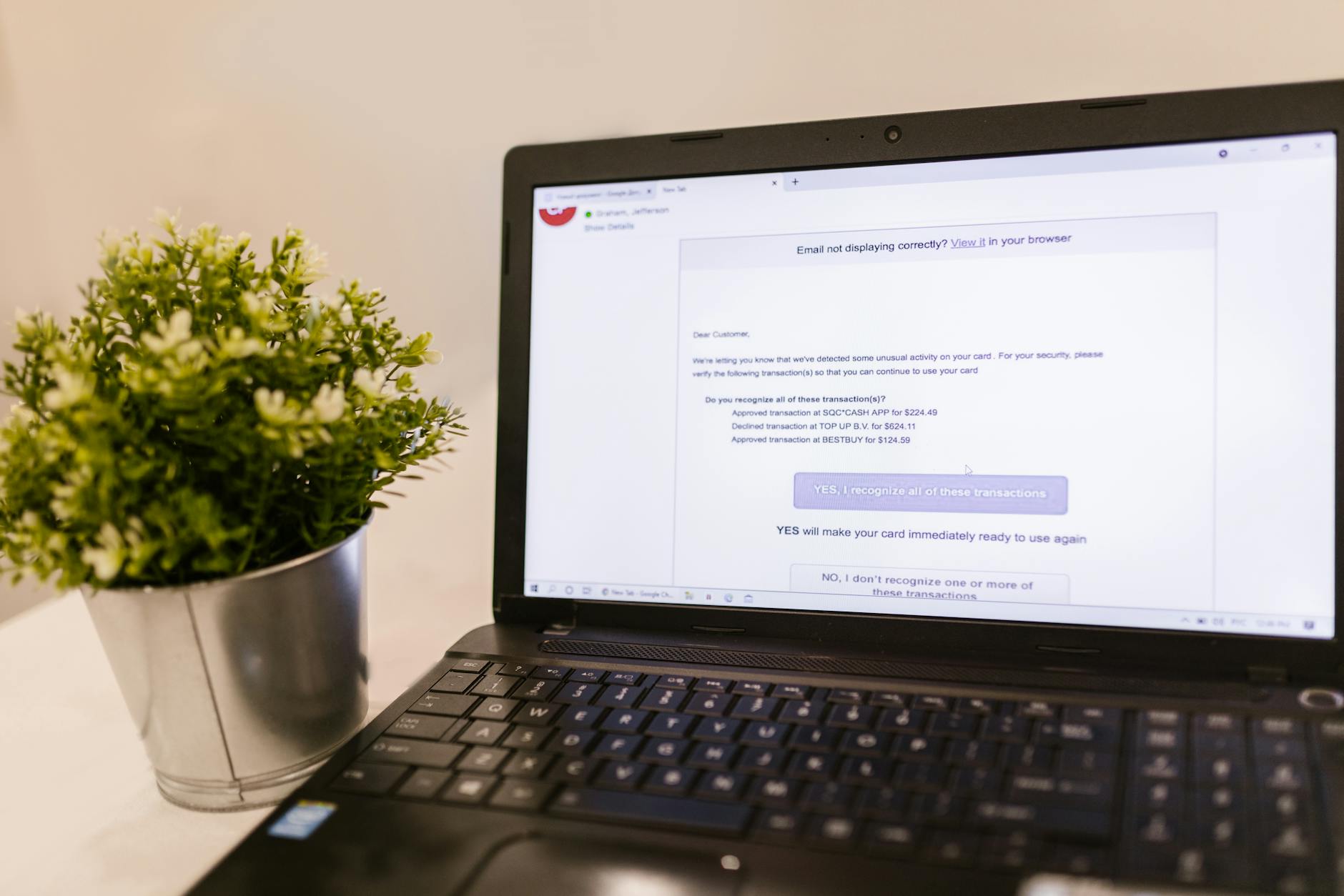
These fraudulent emails typically impersonate major financial institutions like Bank of America, Chase, PayPal, or American Express. They claim that unusual activity has been detected on your account and insist you must verify your identity or confirm recent transactions immediately. The links in these emails lead to convincing fake login pages designed to capture whatever credentials you enter. Some variants also include phone numbers directing you to call scammers posing as fraud prevention specialists.
Threat Profile
| Threat Type | Phishing scam, social engineering attack, credential harvesting |
| Aliases | Bank fraud alert scam, suspicious activity phishing, account verification scam, fraudulent transaction email |
| Target Platform | Platform-agnostic (targets email users regardless of operating system) |
| Primary Goal | Credential theft, financial information harvesting, identity fraud facilitation |
| Distribution Method | Mass email campaigns, spoofed sender addresses, compromised email accounts |
| Impersonated Entities | Banks (Chase, Bank of America, Wells Fargo), payment processors (PayPal, Venmo, Zelle), credit card companies (Visa, Mastercard, Amex) |
| Technical Persistence | None (scam operates through deception rather than system infection) |
| Secondary Payloads | May redirect to malware-hosting sites or initiate drive-by downloads in some campaigns |
| Detection Difficulty | Moderate (emails often bypass basic spam filters; phishing pages may be newly created domains) |
| Credential Misuse Timeline | Stolen credentials typically used within 24-72 hours of harvest |
| Financial Impact | Ranges from hundreds to tens of thousands of dollars depending on account access gained |
| Removal Complexity | Low for the scam itself; high complexity in reversing financial/identity damage |
How It Spreads
This scam spreads through carefully crafted email campaigns designed to reach as many potential victims as possible. Scammers purchase or compile massive email lists, then send thousands or millions of fraudulent messages simultaneously. The emails use spoofed "From" addresses that appear to come from legitimate financial institutions, though examining the full email headers reveals the true originating servers—typically compromised email accounts, disposable domains, or bulk-mailing services hosted in countries with lax enforcement.
The psychological effectiveness comes from the scam's shotgun approach combined with statistical probability. Since most people have accounts with at least one major bank or payment service, a percentage of recipients will indeed be customers of the impersonated institution. Those recipients are far more likely to take the bait. The urgency built into the message—"Your account will be locked within 24 hours," "Suspicious charges totaling $2,347.89 pending approval"—creates panic that overrides careful scrutiny.
Common distribution vectors for the 'Fraudulent Activity' email scam include:
- Mass phishing campaigns: Bulk emails sent to purchased lists, with generic greetings like "Dear Customer" rather than your actual name
- Compromised email accounts: When scammers gain access to legitimate email accounts, they send phishing emails to the victim's contact list, lending false credibility
- Spear phishing variations: Targeted attacks that reference actual information about you (gleaned from data breaches or social media) to appear more legitimate
- SMS/text variants: Similar scams delivered via text message (smishing), often claiming to be from your bank's fraud department
- Search engine poisoning: Fake customer service numbers promoted through paid search ads that appear when you search for your bank's contact information
- Social media messages: Scam messages sent through Facebook Messenger, LinkedIn, or other platforms claiming to be from financial institutions
What It Does On Your Machine
The 'Fraudulent Activity' email scam doesn't install traditional malware on your computer in most cases—it doesn't need to. The scam operates at a more fundamental level by exploiting human psychology rather than software vulnerabilities. When you click the link in the fraudulent email, you're directed to a phishing website that looks nearly identical to your bank's actual login page. These fake sites are carefully designed replicas, often copying the HTML, CSS, and images directly from the legitimate site. The URL might look convincing at first glance—something like "chase-security-verify.com" or "secure-bankofamerica-alerts.net"—but it's not the real domain.
When you enter your username and password on this fake page, the information is immediately transmitted to the scammers' server. More sophisticated versions of the scam employ real-time man-in-the-middle attacks: after capturing your credentials, the fake site actually logs into the real bank website using your information, then prompts you for any two-factor authentication codes. You unknowingly provide these codes thinking you're securing your account, but you're actually giving criminals everything they need to bypass your security measures. Within minutes, they can transfer money, make purchases, or establish access to your account for later exploitation.
Some variants of this scam go beyond simple credential theft. After you've "verified" your account on the phishing page, you may be asked to provide additional information supposedly needed to "confirm your identity" or "protect your account from fraud." This can include your full Social Security number, date of birth, mother's maiden name, account numbers, credit card CVV codes, or even photos of your driver's license or passport. This comprehensive identity theft gives criminals everything needed to open new accounts in your name, file fraudulent tax returns, take out loans, or sell your complete identity profile on dark web markets.
Manual Removal — Step by Step
Immediately disconnect from the phishing site and document what happened
Close the browser tab or window where you entered any information. Take screenshots of the fraudulent email (showing the sender address and full headers if possible) and the phishing website URL. Do not delete the email yet—you'll need it as evidence for your bank and potentially law enforcement. Note exactly what information you provided: just a username and password, or additional details like account numbers, Social Security number, or security questions.
Contact your financial institution using verified contact information
Call your bank or payment service immediately using the phone number on the back of your debit/credit card, on your printed statement, or from their official website (which you type directly into your browser—don't click links). Inform them that you've been targeted by a phishing scam and may have compromised your credentials. They can place a hold on suspicious transactions, issue new cards, change account numbers if necessary, and monitor for fraudulent activity. Do this before attempting any other remediation steps.
Change all passwords from a secure device
Using a different computer or device that you're confident hasn't been compromised, change the password for the affected financial account. Then change passwords for any other accounts where you used the same or similar passwords—especially email accounts, since access to your email can allow criminals to reset passwords for other services. Create strong, unique passwords for each account, and consider using a reputable password manager like Bitwarden or 1Password to maintain them securely.
Enable or reset two-factor authentication
If you hadn't enabled two-factor authentication (2FA) on your financial accounts, enable it now through your bank's security settings. If you already had 2FA enabled and provided codes to the phishing site, you may need to reset your 2FA method—switch to a different phone number or authenticator app. Avoid SMS-based 2FA when possible, as phone numbers can be hijacked through SIM-swapping attacks; use app-based authenticators like Google Authenticator, Authy, or your password manager's built-in TOTP generator instead.
Scan your computer for any secondary malware infections
While the email scam itself doesn't install malware, some campaigns redirect to sites that attempt drive-by downloads or trick you into installing fake "security software." Run a full system scan with Windows Defender (or your current antivirus), then perform a second scan with Malwarebytes Free to catch anything your primary antivirus might have missed. This ensures that clicking the phishing link didn't inadvertently compromise your computer with additional threats.
Check your credit reports and consider a fraud alert or freeze
If you provided personal identification information beyond just login credentials (Social Security number, date of birth, etc.), obtain free copies of your credit reports from all three bureaus at AnnualCreditReport.com. Review them carefully for accounts you didn't open or inquiries you didn't authorize. Consider placing a fraud alert (free, lasts one year, requires creditors to verify your identity before opening new accounts) or a full credit freeze (also free, prevents new credit from being opened until you lift the freeze) with Equifax, Experian, and TransUnion.
Clear your browser cache and saved credentials
The phishing site may have placed tracking cookies or scripts in your browser. Clear your browsing history, cache, and cookies for the time period around when you visited the fraudulent site. Also review your browser's saved passwords—if you used auto-fill on the phishing page, your browser might have saved the fake site as a legitimate login location. Remove any entries for unfamiliar domains or suspicious URLs that resemble your bank's address but aren't exact matches.
Monitor your accounts closely for 90 days
Set up transaction alerts through your bank's mobile app or online banking portal so you receive notifications for every debit, credit, or login attempt. Check your accounts daily for the first week, then several times weekly for at least three months. Stolen credentials are sometimes held by criminals for weeks or months before being used, allowing the victim to let their guard down. Also watch for indirect signs of compromise: unexpected password reset emails, new device login notifications, or account statements sent to different addresses.
Report the scam to appropriate authorities
File a complaint with the Federal Trade Commission at ReportFraud.ftc.gov and the FBI's Internet Crime Complaint Center at IC3.gov. Forward the phishing email to the Anti-Phishing Working Group at reportphishing@apwg.org and to the impersonated company's abuse address (usually abuse@[company].com or phishing@[company].com). If you lost money, file a police report with your local law enforcement—you'll need this documentation for insurance claims or bank fraud investigations.
Educate others and verify future communications
Warn family members, friends, and colleagues about the specific phishing campaign you encountered, especially if it's currently making the rounds. Going forward, adopt a zero-trust approach to unsolicited emails about your financial accounts: never click links in unexpected emails, always navigate to your bank's website by typing the URL directly, and call the institution directly using verified numbers if you receive any suspicious communications. Legitimate financial institutions will never ask you to verify credentials via email.
Prevention
- Verify sender authenticity before clicking anything. Examine email addresses carefully—hover over the sender name to see the actual email address. "Chase Bank <fraud@chase-secure-alerts.net>" is not from Chase. Check for subtle misspellings in domains like "chase.com" versus "ch4se.com" or extra subdomains like "chase.security-verify.com." When in doubt, don't click.
- Never click links in unsolicited financial emails. If an email claims there's a problem with your account, open a new browser window and type your bank's URL directly into the address bar, then log in normally. You'll see any genuine alerts in your account dashboard. This simple habit eliminates virtually all phishing risk from email-based scams.
- Enable two-factor authentication on all financial accounts. Use app-based authenticators rather than SMS codes when possible. Even if criminals steal your password, they won't be able to access your account without also having your phone and authentication app. This provides a critical second layer of defense against credential theft.
- Learn the signs of phishing emails. Generic greetings ("Dear Customer" instead of your name), urgent demands for immediate action, threats of account closure, poor grammar or spelling, and mismatched URLs all signal scams. Legitimate companies don't conduct business through pressure tactics in emails. They provide secure in-app messaging and send non-urgent communications through postal mail for important account changes.
- Keep your email address private and use aliases when possible. The less widely distributed your email address, the fewer phishing attempts you'll receive. Use disposable email aliases for online shopping, forum registrations, and newsletter signups. Services like SimpleLogin or AnonAddy let you create unique forwarding addresses that you can disable if they start receiving spam.
- Install reputable browser security extensions. Tools like Malwarebytes Browser Guard, uBlock Origin, or browser-integrated phishing protection can block known phishing sites before you even see the fake login page. Keep these extensions updated—new phishing sites appear constantly, and updated blocklists provide better protection.
- Regularly review your account statements and credit reports. Catching fraudulent activity early limits damage. Check your bank and credit card statements weekly, and obtain your free annual credit reports from each bureau. Early detection of unauthorized accounts or transactions allows you to dispute them before the situation escalates.
- Use unique passwords for every account, managed by a password manager. If you use the same password across multiple sites and one gets compromised through phishing, criminals will try that combination everywhere. Password managers like Bitwarden, 1Password, or Dashlane generate strong unique passwords and auto-fill them only on legitimate domains—they won't fill your bank password on a phishing site with a different URL.
Bring It In
Email scams like the 'Fraudulent Activity' phishing campaign can have consequences that extend well beyond your inbox—into your bank account, your credit report, and your financial future. If you've clicked on a suspicious link, entered credentials on an unfamiliar site, or simply want peace of mind that your computer hasn't been compromised, bring it to Computer Repair Roswell. We'll perform a thorough security audit, remove any secondary malware that might have been downloaded, verify your system defenses are properly configured, and walk you through best practices for protecting your information going forward. Our technicians understand both the technical and financial implications of these scams, and we can help you understand what steps you need to take beyond computer cleanup.
Located right here in Roswell, Georgia, we're your neighbors—people you can talk to face-to-face about what happened and what needs to happen next. We've helped countless local residents recover from phishing attacks, identity theft, and the full spectrum of online scams. Whether you need immediate help with a compromised system or want to set up preventive security measures so this never happens to you, give us a call or stop by the shop. We're here to help you navigate these digital threats with practical, plainspoken advice and expert technical support. Your financial security is too important to leave to chance—let us help you protect it properly.